1. Log in to your cPanel account.
2. In the Databases section, click on MySQL Databases.

3. In the New Database field, enter a name for the new database you wish to create.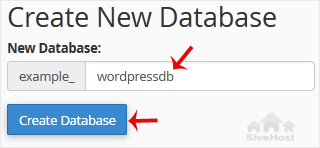
4. Click on Create Database.
- 0 brukere syntes dette svaret var til hjelp

1. Log in to your cPanel account.
2. In the Databases section, click on MySQL Databases.
3. In the New Database field, enter a name for the new database you wish to create.
4. Click on Create Database.
1. Log in to your cPanel account. 2. In the Databases section, click on MySQL Databases. 3....
1. Log in to your cPanel account. 2. In the Databases section, click on MySQL Databases. 3....
1. Log in to your cPanel account. 2. In the Databases section, click on MySQL Databases. 3....
1. Log in to your cPanel account.2. In the Databases section, click on phpMyAdmin. 3. Click on...
1. Log in to your cPanel account.2. In the Databases section, click on phpMyAdmin.3. Click the...
Our experts will transfer your site securely with zero downtime - at no extra cost. Hassle-free migration handled by our team so you can focus on your business.


Copyright © 2026 kele studio. All Rights Reserved.